Showing posts with label Apple. Show all posts

14/01/2013

Setting up your iDevice Part 3

iCloud - iJoe Ultimate Guide

In my opinion the single greatest feature on your iDevice & the most incorrectly configured and under utilised.

This guide will not only help you set up your iCloud but will help you make the very most of it to ensure your iDevice is configured to work for you.

When you first access your iDevice you would of had the options to set up iCloud however for the purposes of this article we shall assist you in setting it up correctly at any point.

Firstly I'll explain the way it works. iCloud is a Cloud based service that stores your data in an encrypted and secure way Here. Its 99% private as Apple has the master key that if government asks for particular data about someone or something it can pass that data on. The best way to utilise iCloud and any cloud service is to put your data in the cloud to free up space else where. For instance I use a cloud music service that plays music on my iPad, this saves me from needing any music on my iPad an allows more space for or data.
iCloud also has other strings to its bow, that i shall cover further into this blog, but the premise is the same, storage in the cloud.

Set-up

Apple ID

First thing you need is an Apple id, I doubt you would of come this far to be reading an Apple blog without an Apple id. However the best way to get one is on your iDevice. Simply go into Settings / iTunes & App Store & Click Create a new Apple id. Follow instructions and BOOM your done.

ON

If you skipped your settings when first activating your iDevice go into settings and then iCloud and the instructions will be repeated. It will ask you if you wish to use iCloud, your answer is yes. It will ask you if you want to Back up to computer or back up to iCloud, make your choice after following the paragraph below.

Backup

With iCloud you can back up your device, and some or all of the contents to the iCloud. This is rather than backing the up to your computer. When backing up to a computer iTunes takes a full data copy of your device and settings and stores that on your computer hard drive. With iCloud not only is it configurable so you decide what data it copies to the cloud but also it doesn't have to take as much data as its taken from the device and not converted, with iTunes it needs to convert the data then convert it back when its sent back to your device.
Also you may only plug your device into iTunes once a week or longer so it takes a back up from that day. With iCloud it backs up at least once a day and you can manually trigger it to do it at any time. So if you lose or break your phone it should be as up to date as possible.

Then it will ask you if you want to use Find my iPad/iPod/iPhone, again make your choice after reading about it below.

Find my iDevice

If you choose to Find your device, you hopefully will never ever need to use it however when you do it could be the difference between you seeing your device again or not.
The way it works is the GPS inside your iDevice works to occasionally find your location for specific apps or system settings. If you lose your device you can use either a free app on another iDevice or go to iCloud.com and track your device. As long as your device is switched on, you can also use the same programs to Lock your device, wipe you device or say you've lost it in your house play a sound. Finally if you access iCloud.com you can also enter your device into lost mode which is a great feature. It allows you to enter a number and a message so you can alert someone that its lost and allow them to contact you with its location, I.E. in a pub or a bar. You can even offer an reward. 
Find my iPhone is worth its weight in gold and has been used to recover lots of devices and lock up the people who may of stolen them. Also recently some insurers are asking that this be utilised otherwise they will void your insurance.
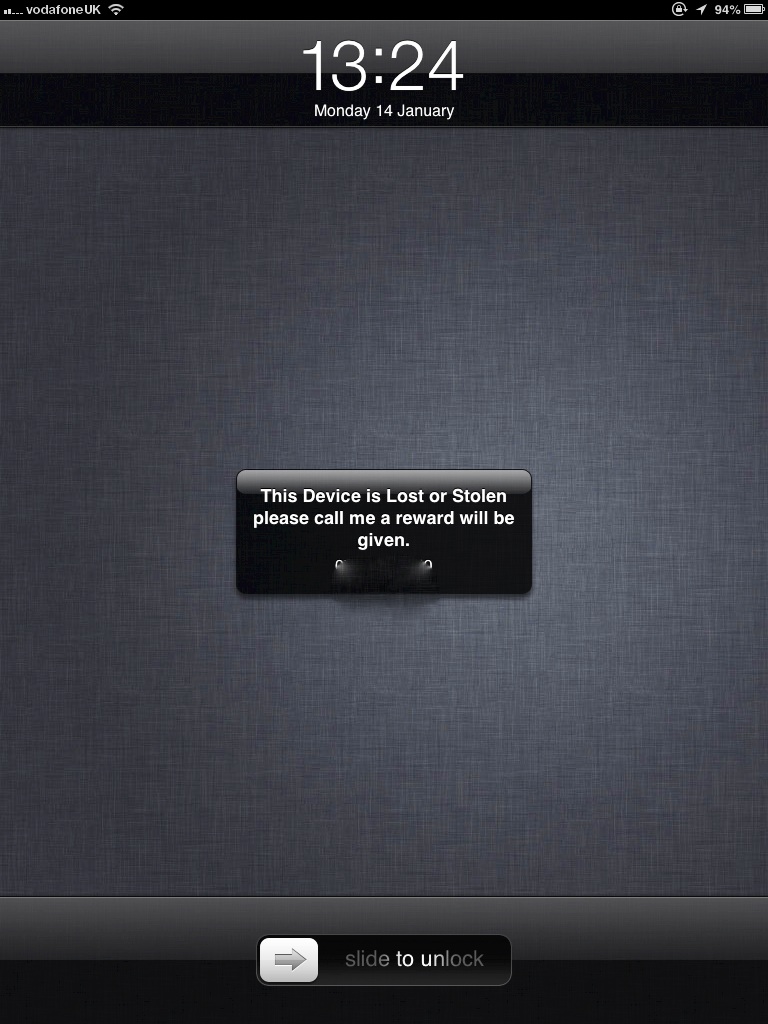
Finally it will ask you if you wish to send diagnostics and usage data to Apple. Generally this is a good thing and nothing you should fear, however if your very sensitive about this you can turn it off at any time.

Once you've set up these options a vast amount of iCloud features begin to work "automagically" it starts backing up all sorts of data. If you go into Settings and iCloud you will be greeted by this screen, with everything on. I'll now explain what everything does, what you can switch off and what you can do.

Mail

When you signed up for your apple id you probably didn't know you got a iCloud email address. its likely some variation on your name followed by either @icloud.com or @me.com you can check by clicking into the account menu in the screen above and then "Advanced" mail. (Obviously my details are blurred out.) So if you use iCloud you can store you emails in the cloud. If you don't use your iCloud email address you can turn this off, however if you then use your iCloud address don't forget to turn it back on.

Contacts

No longer do you need to manually enter all your numbers into your next iPhone. If you store them in the cloud, when you enter your Apple id into the device it will instantly sync your contacts with the new device. Also it updates your contacts when you do so its up to the minute correct information.
If you use an external contacts manager such as Microsoft Outlook, Windows Contacts or another Contacts Cloud service you can turn this off. Even if you use other apps such as Buzz Contacts you still need this switched on as Buzz doesn't store your contacts on its app.

Calenders

This stores all your details from every calender you have on your iDevice and syncs it between your other iDevices, so you don't need to enter all the information manually, if you buy a new iDevice just like your contacts you will only need to enter your Apple id and iCloud does the rest.
Much like contacts if you use another Calender service such as Google Calender, Outlook or Yahoo you can switch this off or if you don't use the calender app you can also disable it.

Reminders

Much like your calender details this stores and syncs all your reminders, so when you have a new iDevice you will never forget to feed the fish. If you use an external reminder service or don't use this app at all then you can disable this.

Safari

This is used to improve your browser experience. If you use Safari on your computer and your iDevice you can sync all your bookmarks and also view something on your computer that you were reading on your iDevice. If you don't use Safari on either device or computer this won't be needed.

Notes

Much like the above it synchronises your notes allowing you to read them on any device or web page. If you use another note service such as Evernote, you can switch this off. 

Photo Stream

Two options here, you can have your own personal Photo stream so that anything you take with your iDevice camera will also show up on any other iDevice and your computer. You can also allow people to share photos with you by allowing a shared photo stream, so say you wish to send a photo of your cat to your friend, all you need is there email and it will be sent via photo stream. A slight variation that I use this feature for is I don't want every photo i take sent to my Computer or other iDevice so I share photos with myself allowing them to be available on both my iPad and iPhone. This also removes them from the Storage from my iDevice so therefore freeing up additional space.
Switch these off if you don't want to use them.

Documents and Data


If you use any app that stores documents for instance Pages by Apple. You need this switched on so you can store your documents in the cloud, so you can work on them on either iDevice or back on your computer without having to transfer them. Also this part saves such things as SMS and other phone data. Switch this off if you don't wish to use iCloud because this is essentially the crooks of the idea.

Find your iPhone/iPad

If for a fleeting moment whilst your breaking into Buckingham Places and you don't want anyone to know where you are you can turn this off. 

Storage & Backup

So as i detailed earlier you can both manually decide what to back up and also Back up manually. In the storage and back up sub menu you can manage both these things and your overall storage. You can also purchase storage if you need additional space.

Manage Storage

Because you signed up to Apple they decided to give you 5 GB of storage for free. If you have a lot of iDevices (More than 3) this will need to be managed, prior to possibly upgrading your storage plan.. Even if you only one device this is a great place to adjust your back up so you only back up the data you really need.

So click on the manage storage sub menu and your greeted with this. A brief breakdown of Your backups, your documents and data and your mail storage. Also at bottom of screen it give you a status bar of how much you have stored of your 5 GB. You can go into your backups to get further details. 

From there you can switch off anything you don't wish to back up its data. Now I have certain rules, yours might be different but I'll explain mine and you decide for yourself. So if any app stores data such as Camera+ stores photos on the app I will back it up. If it stores specific log in detail such as a Banking app will store your log in, i will back it up. I don't back up games as I'm not bothered if I've got to level 345 and when i transfer a device i need to play it again. Apps which log in information that are quite generic such as Facebook or twitter i don't store either.
Its up to you what you do, but remember you only have 5 GB and that won't last as long as you want it too.

You can also manually delete data from the documents and data screen, so as you can see here i have all these documents stored in Pages and i can delete them one by one. For other apps however you can't delete manually from this screen, camera+ for example you need to go into app and delete.

Change Storage Plan


If you've managed your storage and still are running out of room you can always upgrade your storage plan. Apple will obviously charge you for the privilege. Details are as follows.

Backup

So finally you can back up manually. Your iDevice will automatically back up When your Device is plugged in, locked and connected to WiFi  So usually over night unless your an insomniac. However if you want to make sure you can just click the back up now button and watch it happen.

Also if you don't want to back up you can switch it off here.

Summary

So that's every thing you need to know about iCloud. Its a great feature to look after your device data. A lot of features might seem pointless and not necessary but take it from experience when you need it because your device has broken or been lost its really the best thing, and the feeling that you read this article and didn't set up your iCloud will be not nice at all.

Any questions or queries contact me via usual places, links below. Or fire off a comment and I'll get back to you.

iJoe

Follow The Blog on Twitter : @iJoeBlog Like The Blog Page on Facebook : Like Email Me Email iJoe

12/01/2013

iJoe App Showdown - Music

"If it Ain't Broke, don't fix it!" They say.
Rubbish, you can always improve.

So music apps are a massively growing part of iOS and there is lots and lots of Alternatives for the Music app. As you may know iJoe have already Recommended one. But each day more come out and i found one that had been rising up the App Store Charts and one secret nugget and decided to have a four-way app showdown against the native iOS music app and our current Champion.

The Apps i will be reviewing are ;-

iOS Music App.

The general criteria i shall be reviewing them against is UI, Audio, Usability and quality, it will be based on using them as Music players in every scenario you would use a music player, such as with headphones, in the car, on a speaker system, or via airplay.

iOS Music App.

Its been around since the first iPod, and was converted for the iPhone and iPad when those products were released. With all Apps Apple create, they do it in such a way that provides the best use experience for the majority, with the minority begging for years for a few tweaks.

Visually its UI hasn't changed much over the years, even now the Click wheel is resigned to the iPod Classic only it still has the very same menu set up, only now it is obviously displayed on a much larger screen. The menus are now in a light colour which i personally would prefer something a little darker but its Apple's way of making your Music app look like your iTunes on your home computer.

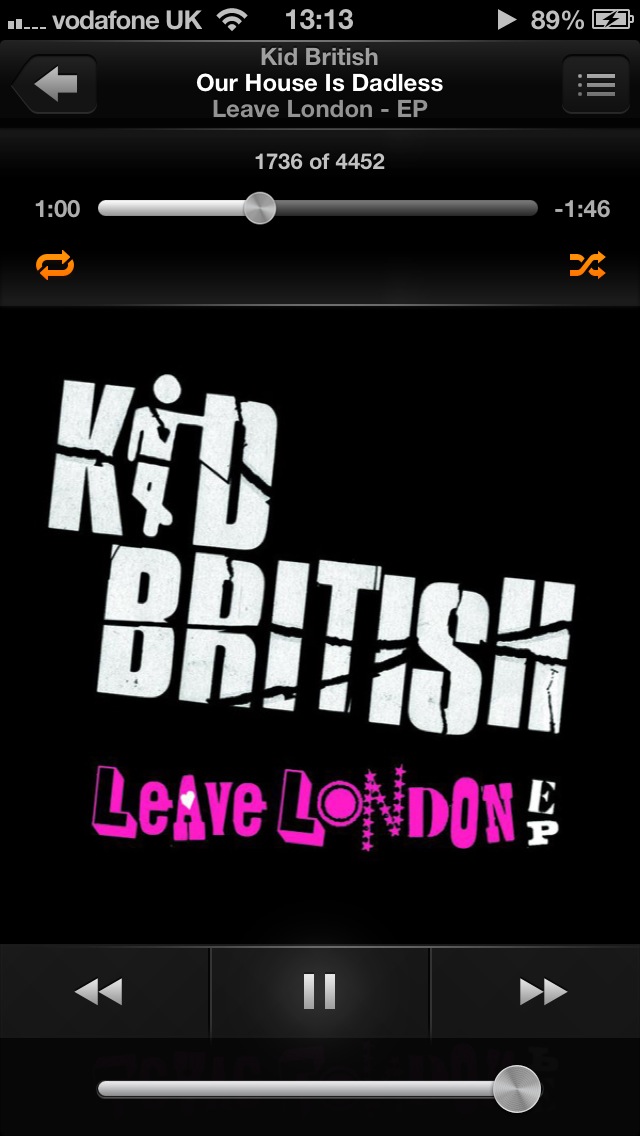
All the menus are there that you need and you can customise the last section to introduce even more dependent on your music taste. The menu UI is very hard to fault, the Now Playing UI however has issues. Ever since the release of iPhone 5 all App developers have been optimising their apps for the new 4 inch screen. Apple obviously knew this was going to be the case, but appears to of not bothered much when changing the Music app, All they appear to have done is make the controls bigger the volume button bigger and the status bar that used to effortlessly disappear now is stuck on your screen. Its a mess, the orange repeat and shuffle buttons don't help they just stand out making the status bar look even worse.

Audio is the same quality no matter what, you have additional features in the settings that can introduce EQ settings, these however for me don't change the quality of all music for the better, its more on an individual track basis.

Usability is typically Apple, works well in anybody's hands, accessible to all and not that complicated. However for a more power user in some situations it does lack, gesture controls don't work so when you wish to change the track you have to use the screen controls at the bottom, when you have a four inch screen i think you should be able to use it ALL.

Its a quality app you can't deny that, it works. Just has a few limitations, volume control is by the button on the bottom or buttons on side of device, no gestures here either. 

When using it with headphones it can't be faulted, especially if you have the headphones with controls. When using a docking station again its pretty spot on, only issue again would be you have to use the buttons on screen if you don't have a remote. Whilst using it in the car thats when it becomes an issue, I use my iPhone as a satnav, iPhone and iPod, so i can see the display at all times, if you want to skip the track you literally have to take your eyes off the road to ensure you hit the button. Dangerous at best. 

Overall its spot on for every user, however has its limitations for some. The UI in the Now playing screen is not for me anymore however it does its job very well.


Rondo Player

Only Launched at the start of this year and is part of a growing trend of "Enhanced Music" apps. All of them claiming to be "The Best" and provide a "Beats by Dre" experience without buying the headphones. I'm yet to be convinced, so been as Rondo Player was on sale i thought i'd take a look.

First i need to explain how it work. Rondo is based on 15 years of Audio research and the premise behind it is that most music is made to be played through speakers, in a room, however when you listen to music either through your head phones or in your car you are not in that type of environment.

For example Stereo speakers are the most likely set up that your music is created for and your speakers would be at a pre-determined distance apart, this creates a depth of sound as it has to travel from the speakers to your ears, headphones however delivery two sound channels that go straight into your ears without utilising any acoustics.

With this app you can configure it in 3 stages, dictated by a circle with 3 sections, The outer circle is designed to replicate you listening to music in a hall or arena, the middle circle is a large room and the inner circle designed to replicate you being in a small room. You don't have to use each setting in each place, its designed so you can change it to get the best depth and richness of sound from the music as possible and your requirements will change from each piece of music, for example if you were listening to opera music that would sound the most "realistic" in the outer circle.

Visually it has a similar menu step to the native app, however this time we have kept a nice dark menu with white text. Looks very crisp. The Now playing screen however is all about RONDO. The display is filled with the circle. It has a disappearing status bar, with the volume and controls the same place as iOS app. The track information is also same place as iOS app. There is also another menu bar which has options for you to turn off Rondo, Lock rotation of sound and also reset to front and centre. There's no displaying of any album art work. I understand you need a place to control this app but this is simply too large and effectively renders it useless as a music player.

Now the big test Audio. Yes it does CHANGE the sound but it depends on the type of music you are listening to. My music taste is quite wide ranging and with a main preference for Rock and R&B music. I did try all different types of music through it to ensure i checked it all out. The outer circle and inner circle for me aren't needed, the outer creates an "Air" sound with your music that makes it secondary to the sound of this air, i realise its to create distance and depth but its simply too distracting. The inner circle makes little or no difference to most music, other than making it louder, some background instruments are brought forward slightly but not enough to enhance it. The middle circle really does enhance your music, it brings it right out and allows you to hear the different instruments individually. It creates a richer/louder sound with more depth. However i have some draw backs to whether it enhances your music, ultimately the music we listen to through headphones we are so used to listening to it through them it actually felt wrong to listen to it in this way, rather than Rondos idea of vice versa. I even tried listening to new music i'd never heard with it and then listened to it without and it didn't change my thoughts on my old music but made me want to listen to the new track in this way over and over. The audio enhancement is what this app is all about, however we are so used to listening to our music "un" enhanced that unless you can put up with that until your new music out weighs your old music i can't see the benefit.

Its simple to use, when you would think the opposite and the developers need to be applauded for that. Theres a small amount of customisation and a help guide. It also has a feature where it links to the gyroscope in your iPhone and moves the sound as you move your device, this however i couldn't understand as if you are walking or running your phone will always be moving and constantly moving the sound.

Its slightly buggy for its first release but its a solid enough app. Dependent on the amount of music your iPhone has it can take a while to load first time, and from time to time when looking through your music it can stop, have a little think, then catch up. App didn't crash whilst i was using it so for that you can't complain.

This app has only one use, with headphones, In the car, on the speaker system it made the sound just louder there was no enhancement and thats fair as it doesn't advertise itself as anything but. However i don't want two or three music playing apps i want 1 that does all.

Overall this app, "Does what is says on the tin." It enhances music, when listening through headphones. I don't think it works as a music player as the Now Playing UI is frankly awful and it only really works through headphones. Its a massive personal preference if you think it makes your music better, i personally am happy with my music as it is and don't need it enhanced.


Car Tunes Music Player.

Now I've reviewed this once before HERE and only one thing has really changed since. It has a small glitch in it that if your listening and your phone locks, and you unlock the phone it pauses the track. 

I'm only going to summarize my thoughts as the previous post is a strong review anyway.

Visuals are clean and crisp, Black and purple throughout, with strong use of album artwork. The now playing screen is very open to customization and the matching status bar is really top notch. The fact the controls and volume are removed makes the player look the full package and it just focuses on your music. If i had a slight niggle it would be that the black and purple can become a little boring, it can kind of make you fed up of black and purple, i'd love it if you could customize that.

Audio is standard, the same as the iOS app, however without the inclusion of the EQ, this isn't a bad thing in the slightest.

It's a delight to use, and easy for anyone to pick up, the gestures to control the music and the volume are basically the industry standard and make this app really useful and stylish.

It's a quality app that has been updated and improved a lot. As i mentioned there is a slight bug / inconvenience that's been there for two releases now its starting to niggle me.

Usage is very strong for dock and car usage, headphones is ok however with that bug it could become very very annoying.

Overall I've used this app for around 6 months now and i wouldn't have written a iJoe recommends post if i didn't like it, the price point is a little steep when compared with others in this post, however its a well designed app thats updated a lot. The black and purple has gotten old for me now so thats one of the reasons i started looking else where. This is a great app.


Listen

Now this isn't that much different to Car Tunes Music Player, infact it takes a lot of what i like with it and removes the bug.

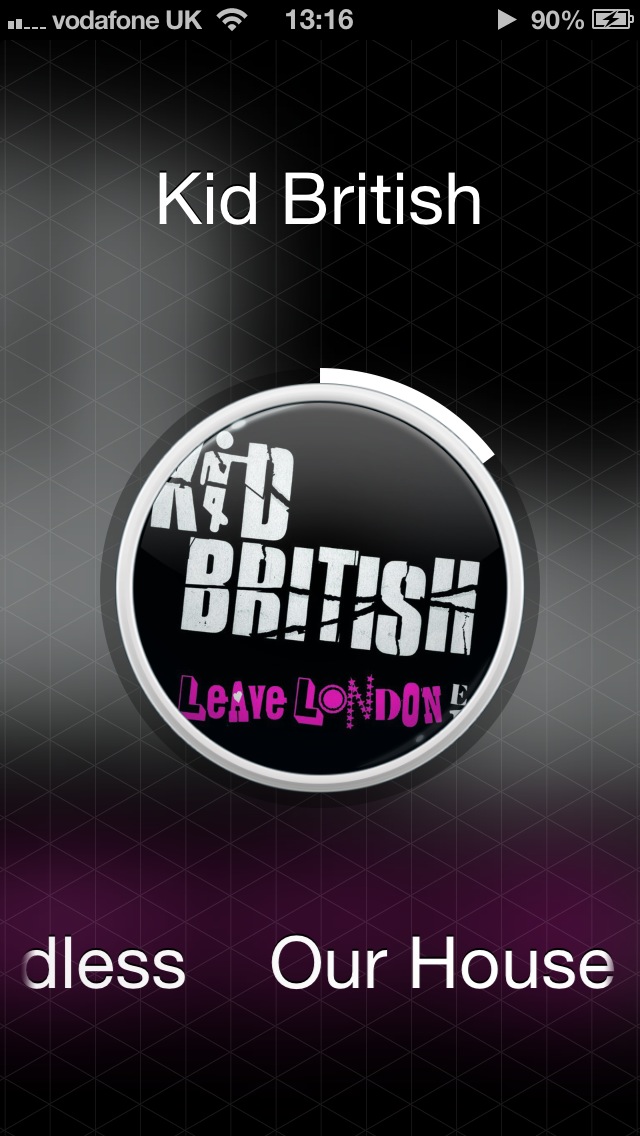
Visually this is a very very easy step to make from the iOS app, the music selection screen is the same as the one of old with the white background and black text, its a little too bland for me and hopefully this is something the developers can develop in their future releases. But the Now playing screen has been developed, It consists of a small circle (Smaller than Rondos) with the centre of your album art work in, around that is your status bar that moves round like a clock, then you have diamond patten that covers the rest of the screen, with a zoomed image of the album art work blurred out behind. I possibly haven't described it as well as i could but check out the photos it looks stunning. Your track name is displayed also. The controls are gesture controled and that shows up in the centre of the circle. One beautiful touch is when you press to play or pause, the screen ripples from the centre outwards its a really nice touch that never gets old.

Audio again is standard without the EQ, as i've previously stated there's nothing wrong in my opinion with the standard audio settings.

Usability is great and really turns heat up on Car Tunes. The general premise is the same, swipe to change tracks, hold and slide up and down to change volume. The track change is the opposite way, so you swipe left to right to go forward and right to left to go back, however you can change this back in the options menu. Personally i think you should swipe right to left to get the next track as you do in most other apps. To access your music is quite nice however a little difficult in certain situations. You have to pinch out and it appears from the centre of the screen, however i found it occasionally taking a few times to actually work, i think this maybe because the contact patch for your touch is much less at the top of your fingers where your more likely to perform this action, also it could be a problem for ladies with nails that are long as you would need to carry out the gesture differently. However the developers have covered this off, if you don't wish to pinch out if you press and slide to bottom left corner this also accesses your library so it looks like that is more likely to be used. The app also features sharing capabilities if you press and slide to top right, you can post to twitter, Facebook or email and message someone, not that i think anyone will. One feature that this uses that i've not seen any 3rd party apps use before is the ability to access your Airplay options. Its done by pressing and sliding top left, it may only be used occasionally but its better than not having the feature at all.

The app is well developed and set up however there is a bug sitting in the system where if you access your Library and wish to select the letter the artist or album begins with the app will crash, doesn't crash when using it on songs. This is a major bug but one i had to find as i only usually use playlists to listen to my music. This i'm sure will be corrected by the developers, this is a very young app thats only been on App Store since September 2012 so i can see a lot of room for development in this app.

This app also works well in the dock and the car and indeed has a feature that will dim the screen if you want it so it doesn't lock, however this will effect battery life.

Overall this is a quality little app that matches with a seasoned app like Car Tunes on many fronts, with its own personality. The visuals make this app as does the little extras such as the ripple effect and the airplay features. The current sale is even more a reason to purchase this app as 69p is a mass saving.


iJoe's View

These apps are 3 of thousands in the app store that offer an alternative for the default music app and a lot of it will be down to personal preferences.

If you are not looking for a replacement for the iOS app, then there it is, sitting already in your phone.

If you want a music app that really enhances/changes your music and you don't want to spend any money then Rondo Player is for you. I should note there are a lot of these sorts of apps coming out at the moment and Rondo player is the only one that is free, so just to experience the "Enhancements" its worth a download.

If you want a High quality alternative to the iOS app that has its own personality and own qualities then its up to you if you want Car Tunes Music or Listen. Both have slight bugs that may effect your experience. Both have great visuals that you might like or dislike. But most importantly both have lots of room to enhance there apps so your decision today might change tomorrow.

Personally i've used Car Tunes Music for 6+ months and still have it on my iPhone, however something about the freshness and difference with Listen is drawing me more to use that. Maybe is the old phrase "A Change is as good as a rest."

Ultimately this app showdown has proved one thing. The App store is a amazing, diverse community thats literally dripping with quality apps to suit all needs.

iJoe

Follow The Blog on Twitter : @iJoeBlog Like The Blog Page on Facebook : Like Email Me Email iJoe


21/12/2012

Keep Up To Date With iJoe.

So far since launch I've been overwhelmed by the amount of page views I've had on this blog. Thank you so much for your support.

I'm really trying to push the word out though. So here's a few ways you can keep up to date.

Follow The Blog on Twitter : @iJoeBlog
Like The Blog Page on Facebook : Like

If there's anywhere else you want me to go let me know.

Also show your support by using my Logo wherever you feel best.(Thanks to H for the Design)


iJoe


Follow The Blog on Twitter : @iJoeBlog
Like The Blog Page on Facebook : Like

17/12/2012

Why Google Putting Apps on iOS is a stupid business Decision...But one that needs to be done.

So a quick search of the App Store for "Google" reveals the following (With their rivals in brackets) :-

Google Maps (Apple Maps)
Google Chrome (Safari)
Google Search (Bing/Yahoo)
You Tube (Vimeo)
Gmail (Sparrow, Mailbox (Released 2013)
Blogger (Wordpress)
Google Latitude (Foursquare/Facebook)
Google Earth (Bing Maps)
Google+ (Facebook/Twitter)
Google Translate (Free Translator Apps)
Google Drive (Dropbox)
Google+ Local (Nearby/POI apps)
Google Currents (Flipboard)
Google Shopper (eBay/Amazon)
And New This evening
YouTube Capture (Apple Camera)

So Google clearly has a iOS presence but it confuses me why...

DOES APPLE HAVE APPS FOR ANDROID?

Simple answer no. They only do two Windows computer apps which are iTunes and QuickTime and it makes sense.

If you use iWork on your MacBook and your want documents on the go, what do you buy???

An iPhone or an iPad.

GOOGLE HOWEVER HAS BEEN BACKED INTO A CORNER.

iOS has a massive user base (Last figures released 365 Million, and that's before iPhone 5, iPad 4 and iPad mini.) Thats something google cant ignore it had customers before Apple started selling phones, lots of people had a Gmail account, so it needs to please those customers.

However I don't understand why they supply apps for everything, don't get me wrong I'm grateful - this blog is being typed on blogger, but imagine for a second they didn't supply apps to iOS.

WHAT WOULD YOU DO IF?

You have a Gmail address. Would you change phones or change email address?
You want to use Google Maps. Would you change phones or use Apple maps?
You want to blog on Blogger. Would you change phones or use Wordpress?
You want to browse on Chrome. Would you change phones or use Safari?
Etc etc

I can imagine there is enough Google "Fan boys" out there that would change phones but Google is happily producing very good IOS to encourage people to use its products.

In my humble opinion Google will never be as big as Apple because of this, and I think the fact they make Apps for iPhone and even buy up iOS developers such as Sparrow, shows they will always be second in a mobile world.

Looks like Steve Jobs didn't need that Thermonuclear war on android.

iJoe

Follow me on Twitter @Joebromley